
COMPANY
Zopa
Year: 2024
Role: Product designer
Team: Product manger, product director, compliance, content, Engineering
Objective
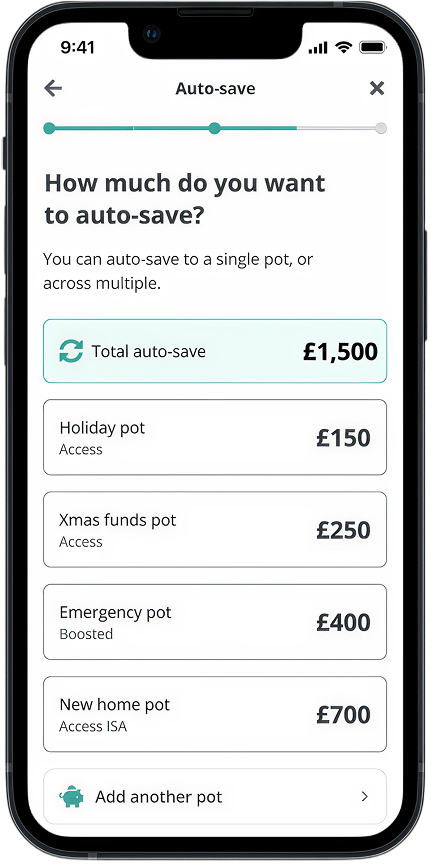
To enhance Zopa’s Auto-Save feature by leveraging open banking to give customers greater flexibility and control when funding their savings. The goal was to simplify the process by enabling users to automatically split deposits across multiple savings pots, reducing manual effort while maintaining transparency and choice.
Measuring success
To define what success looked like for the Auto-Save enhancement, we had clear, measurable goals focused on adoption, engagement, and customer value. The feature’s impact would be assessed using the following KPIs:
1. Adoption rate
+30% uplift within first 3 months: Does the experience encourage more customers to automate savings.
2. Retention rate
>75% rentention: do customers find repeated value and continue using the feature beyond setup
3. Monthly inflows
25% uplift across Smart Saver inflows: business impact of total money saved through automation
Desk research
Comp analysis
To design an intuitive and market-leading payment experience, I conducted a comprehensive competitive analysis focusing on both incumbent banks and challenger banks. The goal was to understand how the industry approaches payment flows, identify best practices, and uncover gaps and opportunities where we could differentiate. I explored:
- Incumbent Banks: Analysed traditional high-street banks to understand established user expectations, common mental models, and long-standing approaches to payment management.
- Challenger Banks: Studied modern fintech competitors like Monzo, Revolut, and Starling, assessing how they’ve simplified payment flows, reduced friction, and leveraged automation to enhance the experience.
- Benchmarking: Evaluated everything from information hierarchy and navigation patterns to security measures, setup flows, and personalisation strategies.
Plum
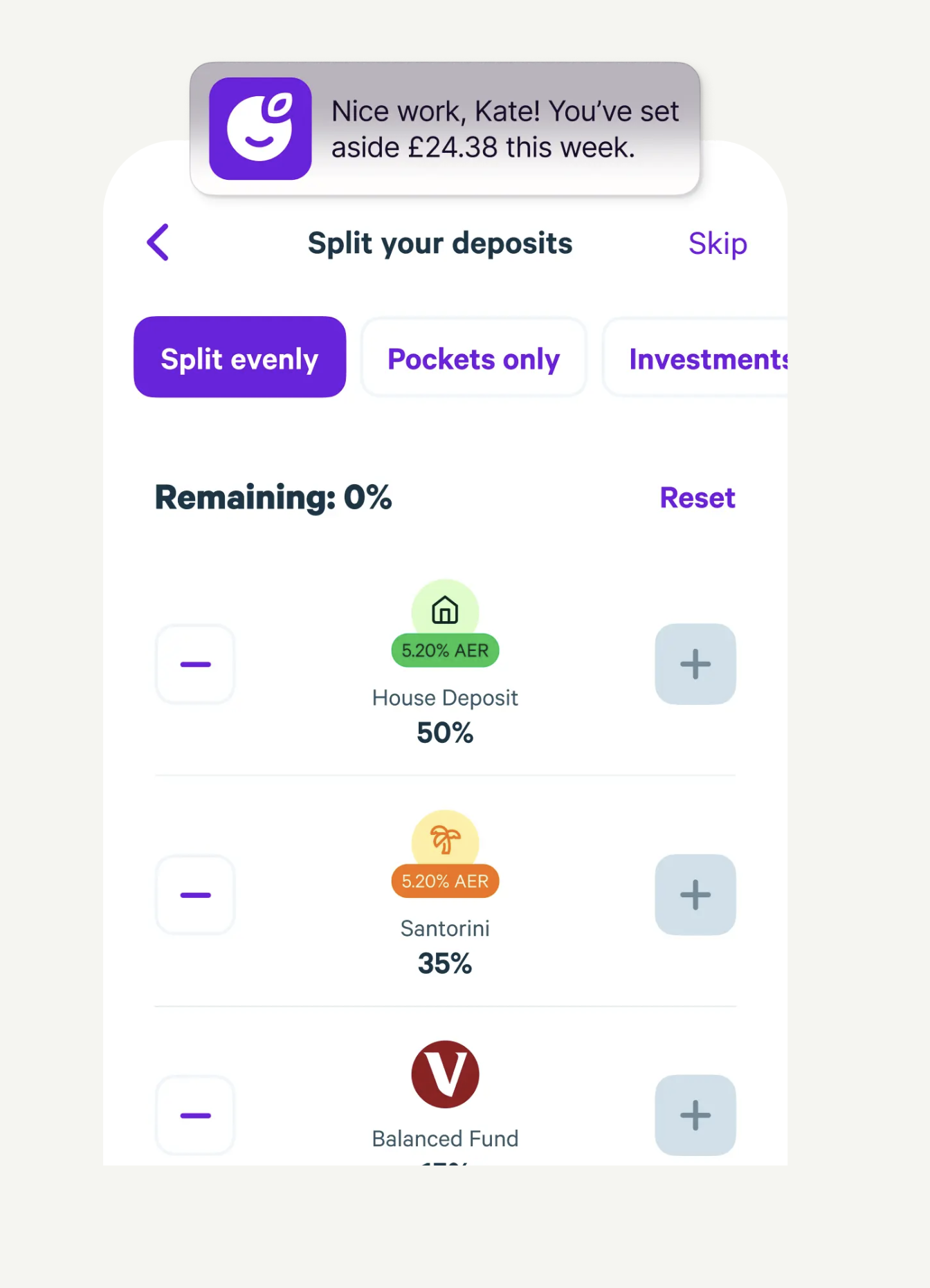
Plum uses artificial intelligence to analyse income and spending habits, then calculates an affordable amount to save each month. This amount is automatically transferred from your bank account to your Plum savings "pockets." Users can set smart rules for how and when these transfers occur, making the process flexible and customizable.
Smart Rules
You can set specific rules for saving, such as rounding up transactions to the nearest pound and saving the difference.
Monzo
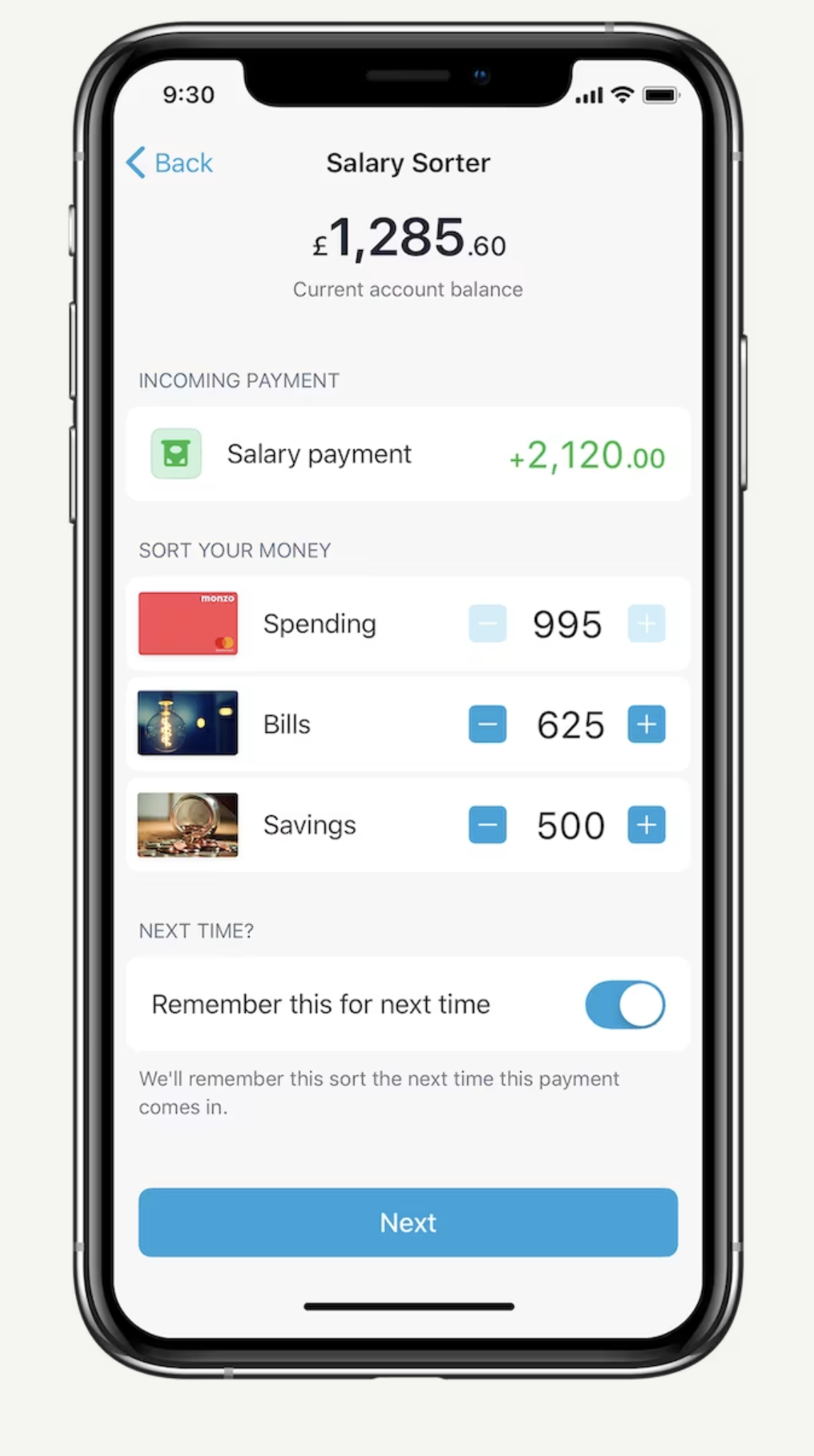
Monzo's autosave feature, known primarily through its "Pots" and "Round-ups," is designed to help users save effortlessly.
Pots
These are sub-accounts within your main Monzo account where you can set aside money for specific goals or expenses. You can create multiple Pots for different purposes, such as holidays, emergencies, or upcoming bills. Users can transfer money into these Pots manually or set up recurring transfers.
Round-ups
This feature automatically rounds up your card transactions to the nearest pound and saves the spare change into a designated Pot. For example, if you spend £2.50 on a coffee, Monzo will round up the transaction to £3 and transfer 50p into your Pot. Premium users can increase this round-up to 2, 5, or 10 times the spare change, accelerating their savings.
Starling
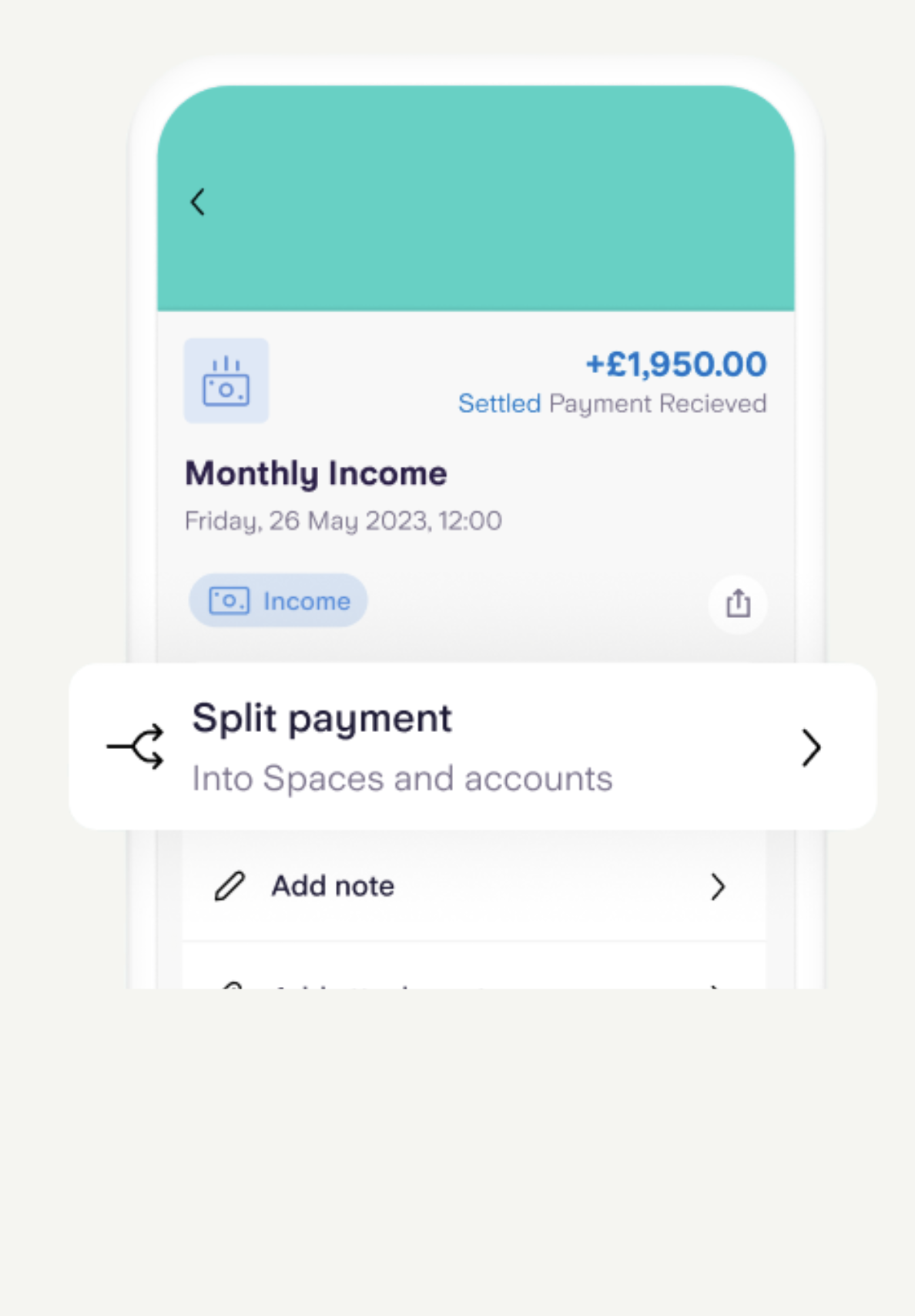
Starling Bank's autosave feature, called "Savings Spaces," designed to help users manage and grow their savings effortlessly.
Savings Spaces
These are virtual piggy banks within your main Starling account. You can create multiple Spaces for different savings goals, such as holidays, emergency funds, or upcoming expenses. The money in these Spaces is kept separate from your main account balance, helping you to visualize and achieve your savings goals more effectively
Round-ups
This feature automatically rounds up your card transactions to the nearest pound and transfers the spare change into a chosen Savings Space. For example, if you spend £3.50, the remaining 50p is moved to your savings. This incremental saving method helps you accumulate savings without significant effort.
Insights workshop
To set the foundations for designing an experience that enables customers to auto-save into multiple savings pots, I ran a collaborative workshop with the product, design, and research teams. The goal was to align on what we already knew about our customers and identify the knowledge gaps that needed further validation.
Workshop Obectives
- Map out what we know about customer saving behaviours, goals, and mental models
- Highlight what we don’t know
- Identify key assumptions about how customers manage their savings
- Define the research priorities that would guide future discovery activities
Outcomes
- Created a shared understanding across teams of customer needs and behaviours
- Highlighted opportunities to improve the Auto-Save experience by reducing manual effort while maintaining control
- Generated a clear set of research questions to validate before moving into design
- Aligned stakeholders around the next steps, ensuring that customer insights would drive decision-making throughout the project
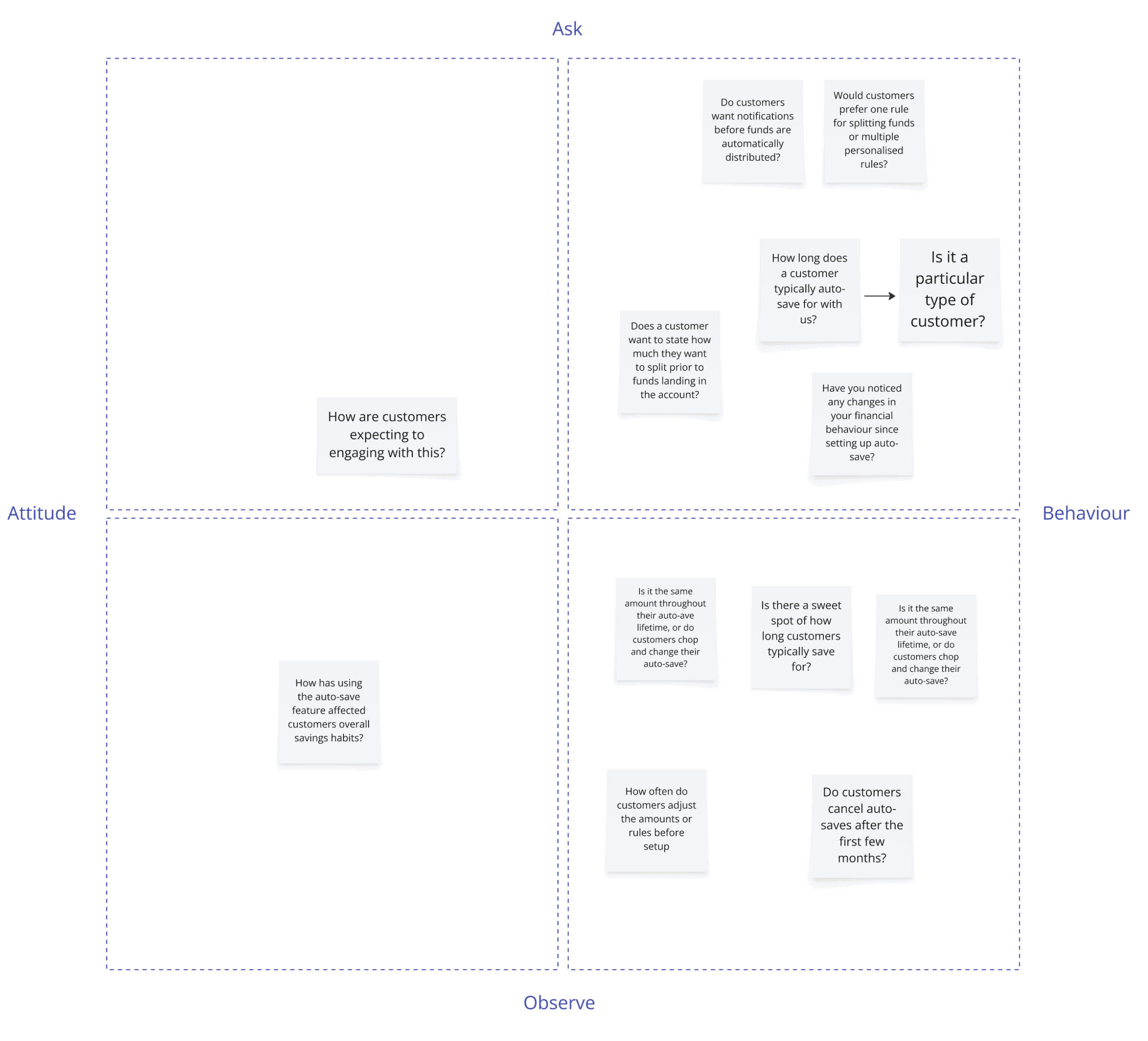
Problem statement
Our workshop revealed that while customers want to save regularly, their behaviours are inconsistent and fragmented. Many contribute to their savings once a month, but the amounts vary, and most manually move money between pots after making a deposit.
Although we know customers value control over how their savings are distributed, we don’t fully understand:
- How they prioritise pots when splitting deposits
- What level of automation vs. manual input they’re comfortable with
- Whether customers want to set up personalised rules or prefer default options
- How their saving habits and confidence change when automation is introduced
- These gaps make it difficult to design an Auto-Save experience that balances flexibility, transparency, and ease of use. We need further research and validation to ensure we build a solution that aligns with customer expectations and truly simplifies the savings process.
Research
To close these gaps, I proposed and our customer interviews which were designed to validate our assumptions, uncover new insights, and ensure we were solving the right problems before moving into design. This was important and had immediate buy-in as it was clear that were a number of unknowns that we needed to get to grips with and better understand. The workshop revealed critical gaps:
- How customers prioritise pots when splitting deposits
- What level of automation vs. manual control they are comfortable with
- How much flexibility and personalisation they expect
- Which mental models customers use when thinking about savings
- the language and terminology that resonates with users
What I did
- 8 interviews (60 mins)
- Spoke with single pot savers
- Spoke with multi pot savers
- Users already using auto-save
- Users managing their savings manually
Topics I explored
- How they decide where to allocate deposits
- Comfort levels with automation vs. control
- Expectations around notifications, confirmations, and flexibility
Learned
At a high level, our key takeaways were:
- Customers value flexibility, but trust is criticaly. Many want transparency and reassurance before letting automation take control.
- There’s no single mental model for saving. Some users prioritise pots based on goals, others based on amounts or timelines.
- Users want options, but not complexity.
Design
With a clearer understanding of customer behaviours, attitudes, and needs from our research, the next step was to start considering how we transition to the design phase. Whilst we learnt a lot from our research, we didn't have alignment immediately in terms of the focus of the experience for our customers and business. We arrived at the decision of 2 hypotheses which would give me path forward to shape the designs.
Hypothesis 1: Users prefer percentage-based rules over fixed amounts.
Hypothesis 2: Users want both a global Auto-Save setting and per-pot overrides.
Our Goal
- How customers set up Auto-Save rules across multiple pots
- The level of control users need during setup and ongoing management
- The best way to visualise allocations to reduce friction and confusion
- Where Auto-Save entry points should live within the app
Wireframes
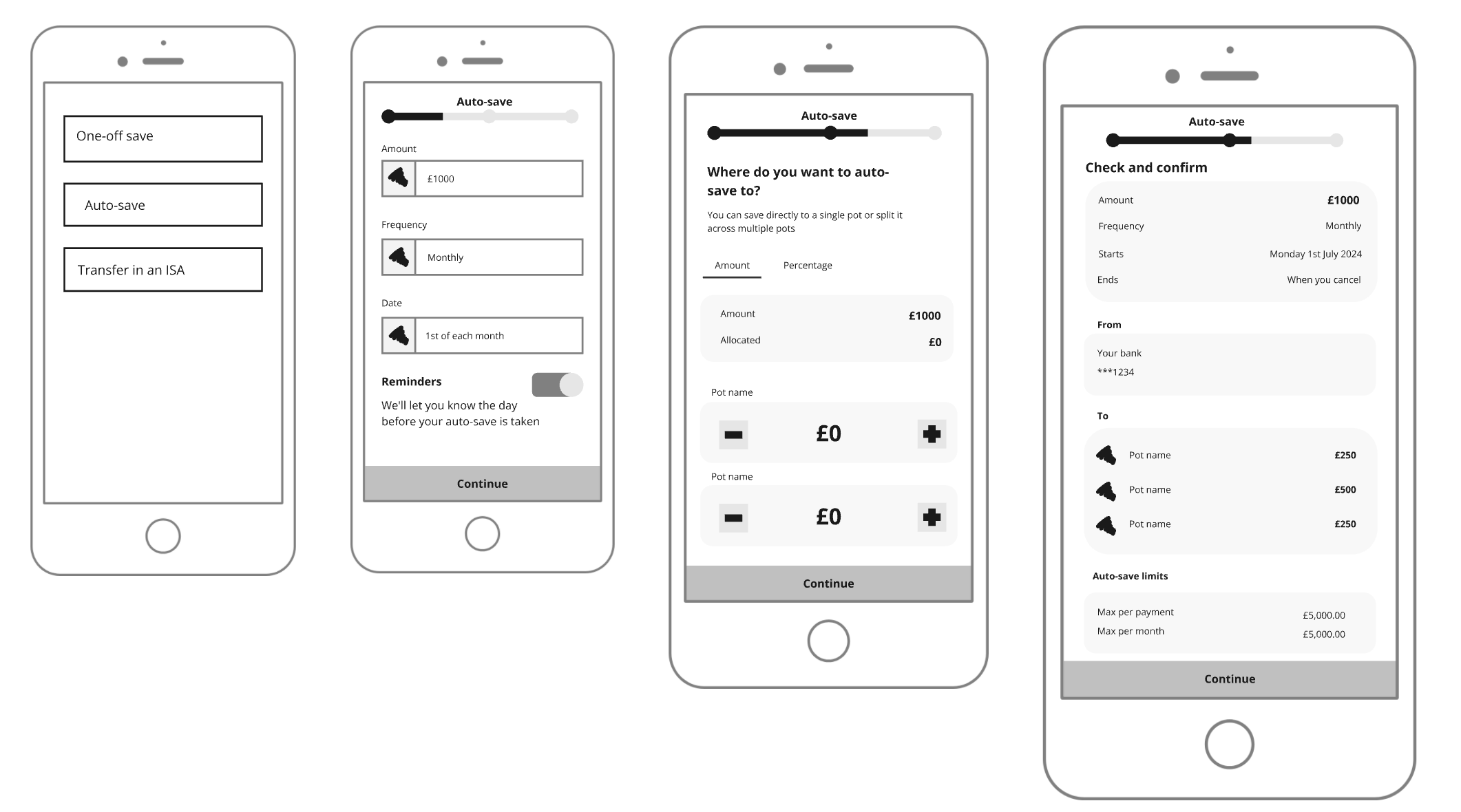
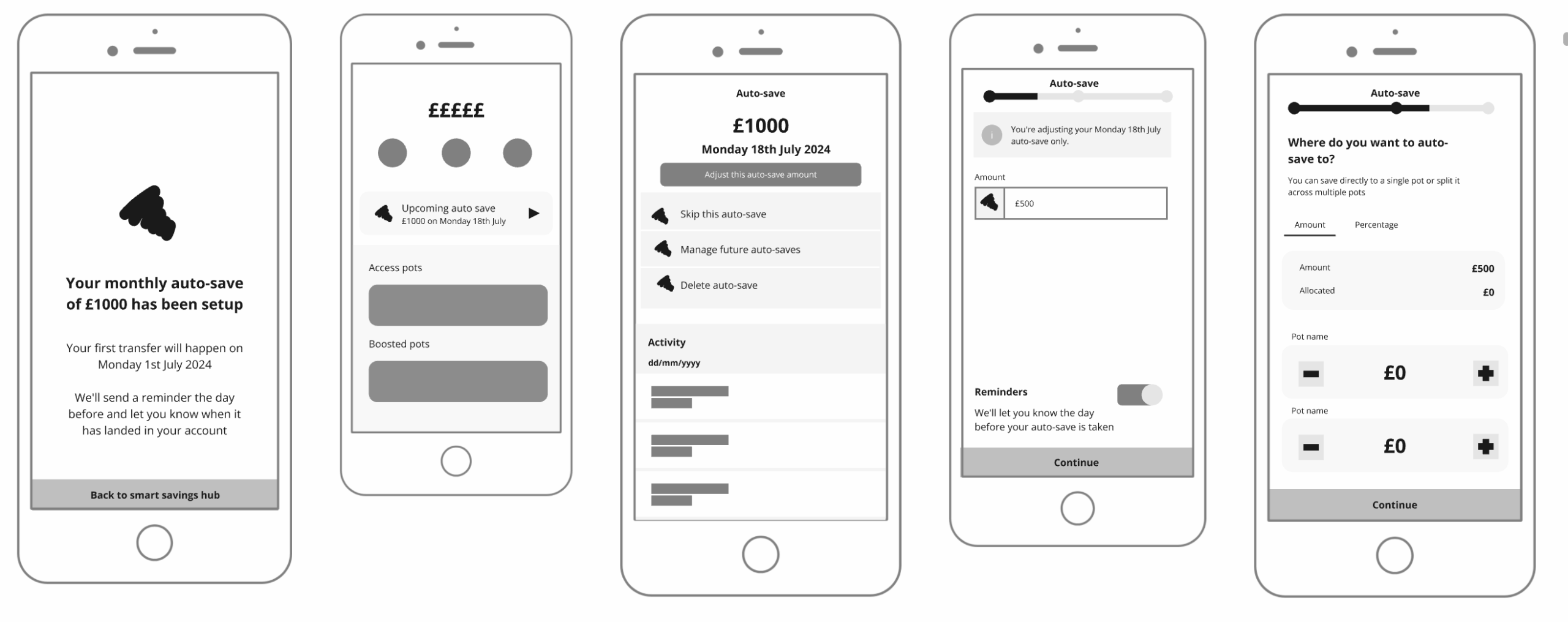
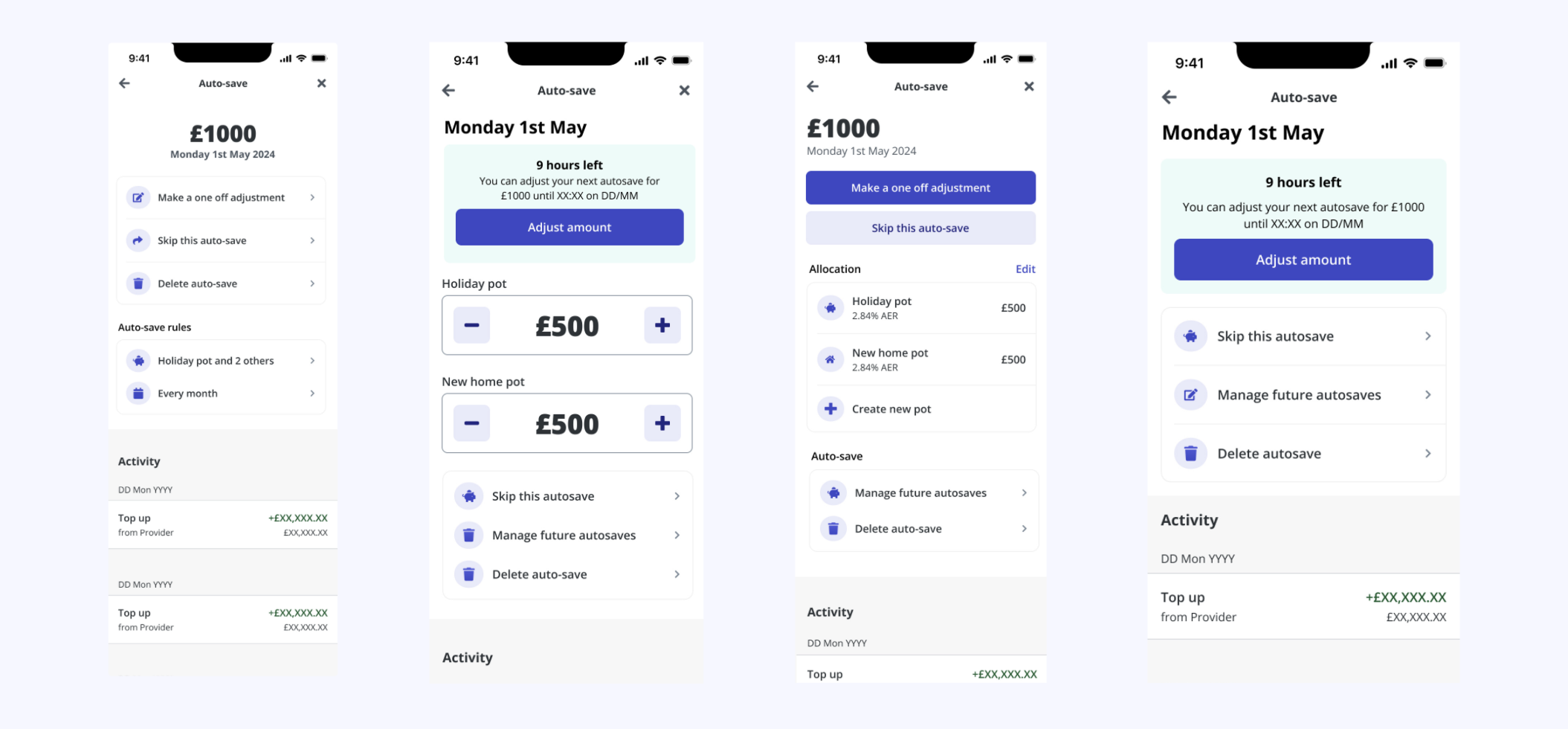
When creating the initial wireframes, my goal was to explore different approaches to how Auto-Save could work across multiple pots while keeping the experience intuitive and lightweight. I started by experimenting with navigation patterns to understand where users would most naturally expect to set up Auto-Save — whether from a centralised hub or directly within individual pots. I also tested different types of allocation inputs, comparing sliders for quick, visual adjustments against number fields for users who wanted more precision and control. A key focus was on how to visualise the split of funds clearly so customers could confidently see where their money would go before confirming. Finally, I explored placement within the journey, testing whether Auto-Save made more sense as part of the initial deposit flow or as a standalone setup process. These explorations helped us surface early insights and shape hypotheses for usability testing.
Testing the thinking
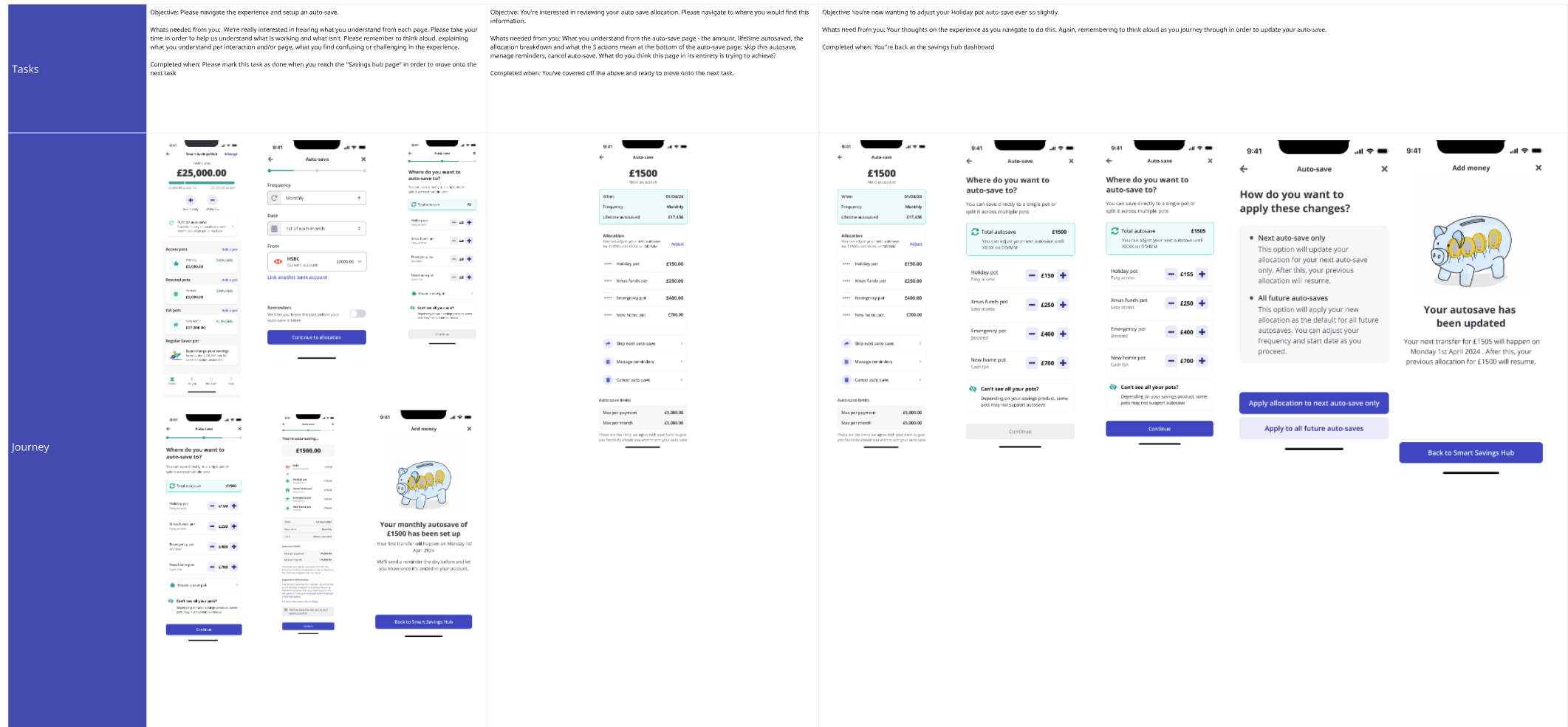
We ran remote usability testing sessions with a diverse mix of customers, including single-pot savers, multi-pot savers, and those already using Auto-Save. The goal was to understand how customers interacted with the proposed flows, validate our assumptions, and identify any areas of friction before investing further in high-fidelity designs. During the sessions, we explored three different journeys, a simple single-rule Auto-Save setup, a flexible multi-rule version, and a hybrid approach combining both. We observed where customers expected to set up Auto-Save, how easily they could allocate deposits across pots, and whether the visualisation of splits built confidence in their choices. These tests revealed that customers valued simplicity first, but also wanted optional flexibility through overrides when needed.
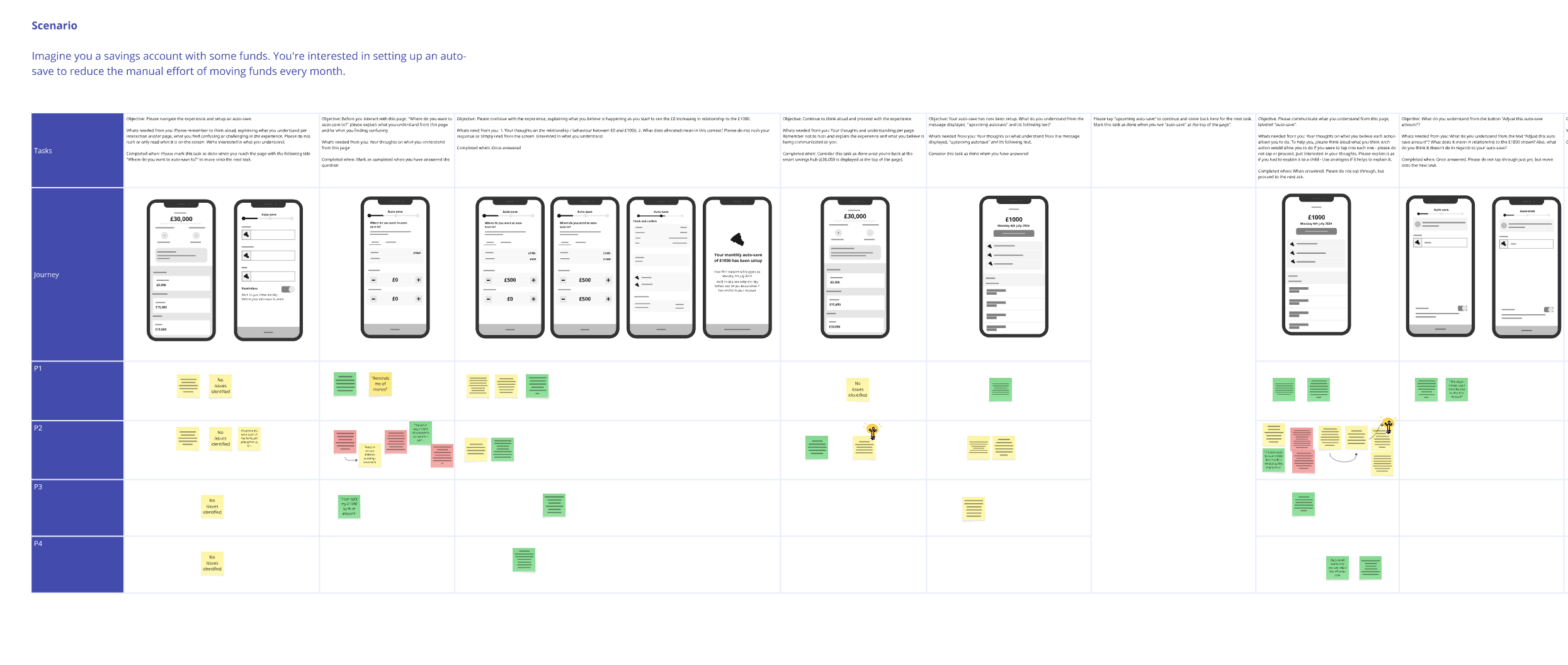
Insight 1 |Simplicity wins, but flexibility matters
“I want it to just work, but I still want the option to tweak it.”
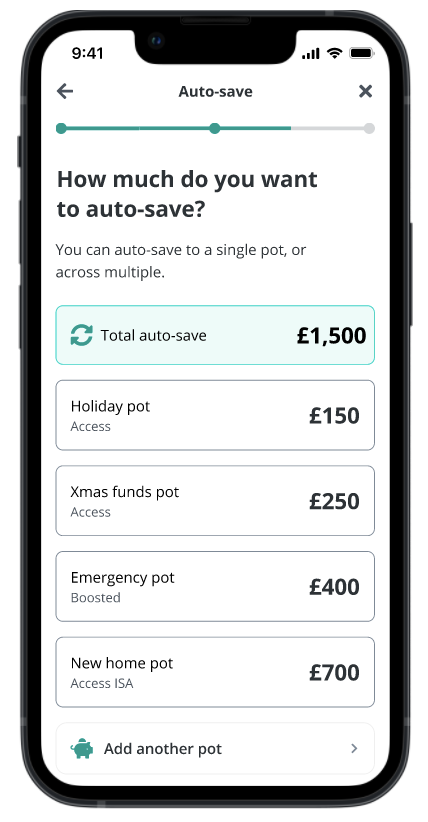
- Customers preferred a default, single Auto-Save rule for simplicity but expected the ability to override allocations per pot when needed.
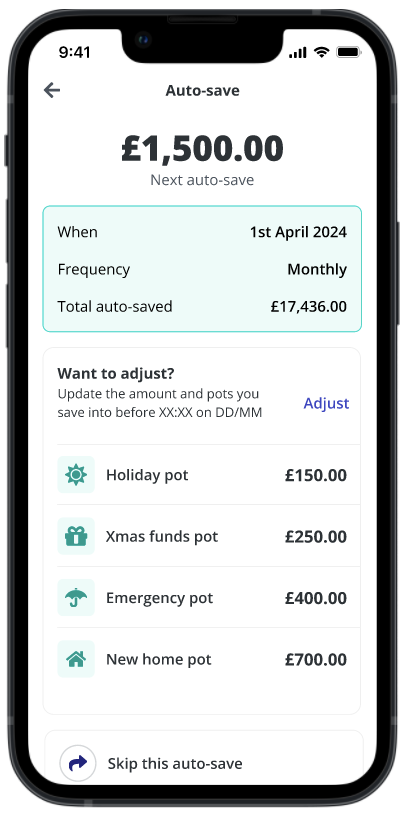
- This led us to adopt a hybrid MVP model: one global rule, with optional per-pot customisation.
Insight 2 | Visualising splits reduces cognitive load
“Just seeing how my auto-save will split helps with potential planning”
- Participants preferred going to the effort of manually entering in numbers rather than a slider as it gives confidence to locking in a decision
- Whilst some think in percentages, it was easier for participants to manually input rather than try to interpret a percentage of split
Insight 3 | Contextualising auto-save in the right place
- Most users looked for Auto-Save within their existing pots rather than a centralised settings menu.
- We adjusted our MVP so Auto-Save can be accessed inline at pot level, while still maintaining a central hub for visibility across all pots.
High fidelity
After validating our hypotheses and testing early wireframes with customers, I moved into high-fidelity design to explore how the Auto-Save to Multiple Pots experience could look and feel in the app. The goal at this stage was to refine the interaction patterns, visual hierarchy, and information density while maintaining clarity and trust around automation.
One of the key challenges was finding the right balance between flexibility and simplicity. From usability testing, we learned that customers wanted the ability to override allocations per pot, but didn’t want the process to feel heavy or overly complex.
Design system
One of the key challenges was working within Zopa’s existing design system. While the system provided a solid foundation for consistency across the app, its current components were not optimised for more complex financial interactions like splitting deposits across multiple pots.
The primary challenge was balancing flexibility with system constraints. Customers needed to adjust allocations, manage overrides, and visualise distributions, but the existing UI components were designed for simpler, single-action flows. This meant exploring creative ways to repurpose existing patterns without compromising usability or clarity. If you look at Zopa today, particularly the app, we've moved this narrative along, but still have some screens in our old kit whilst the brand continues to make this transition.
Exploration (extract)
Taking an internal bet with some testing
Once the high-fidelity designs were ready, I ran a museum tour with the core team to walkthrough the high fidelity thinking so that I had consensus and a way forward. Through dot voting and discussion, we landed with a core experience we were happy to proceed with, but knew we needed that bit more additional testing to ensure we had the right confidence in the direction we wanted to head in.
Audio extract from interview
Development handover
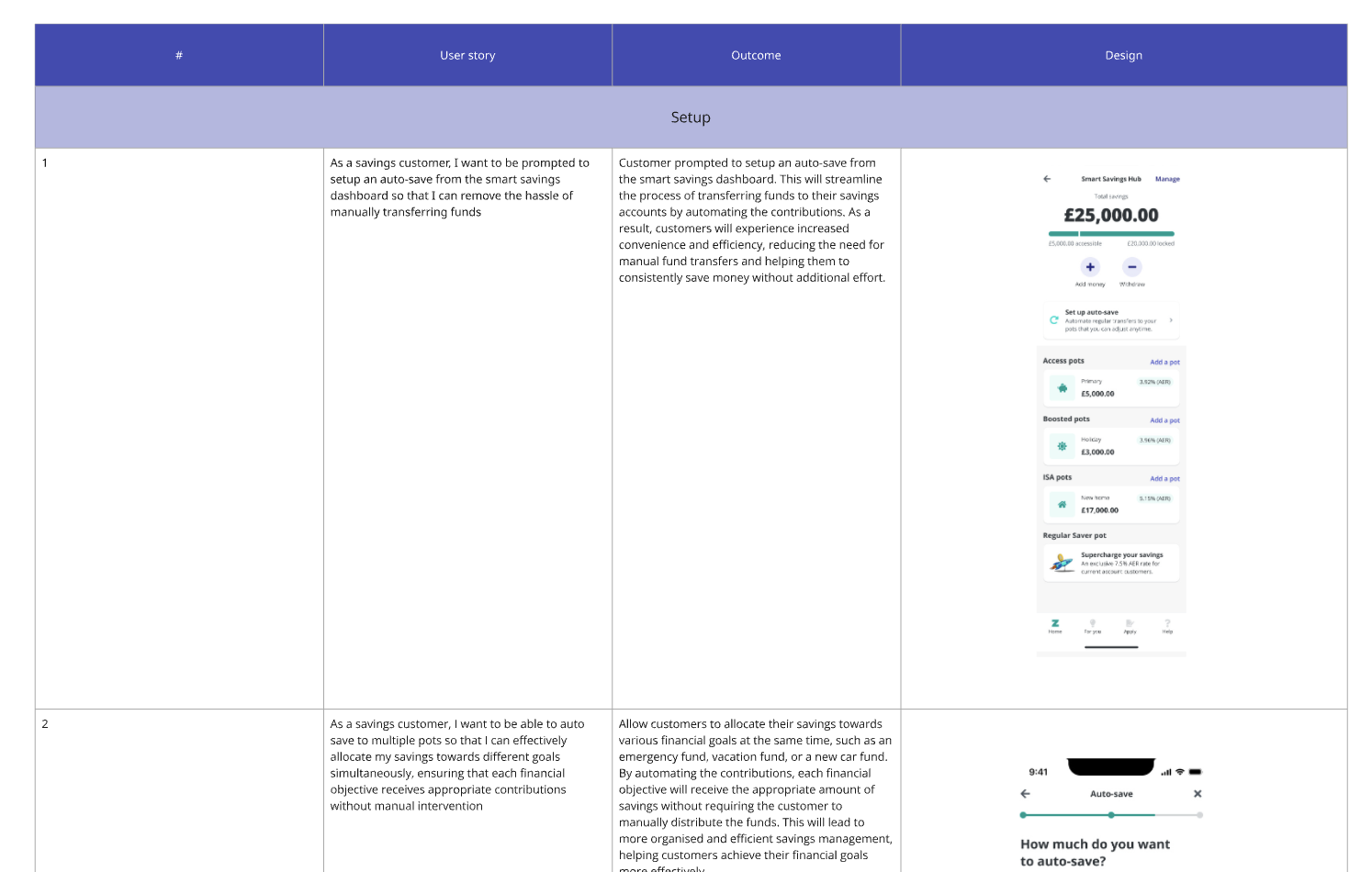
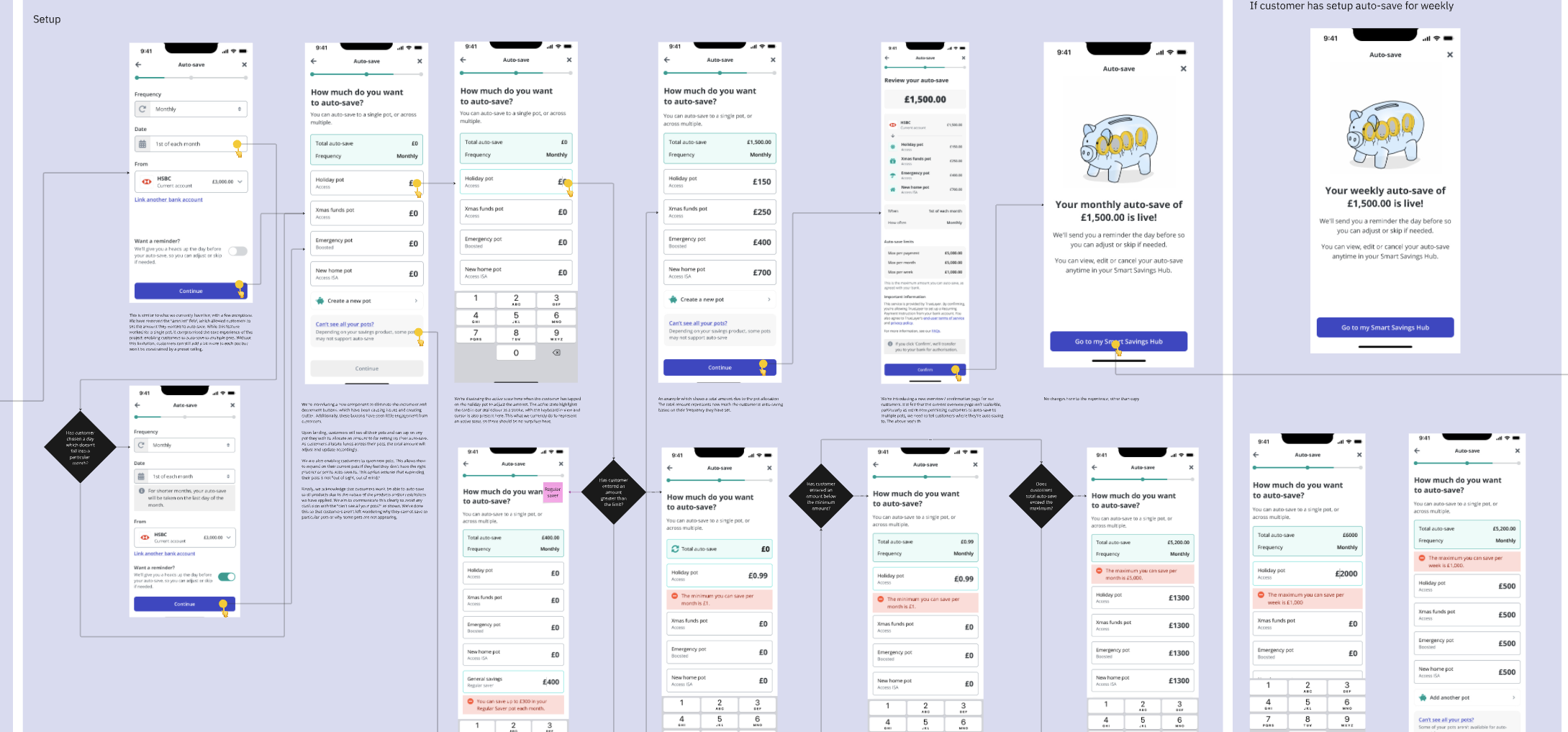
Once we had validated the designs through usability testing and aligned on the hybrid Auto-Save model for MVP, the next step was to prepare a structured development handover. Given the complexity of allowing customers to auto-save across multiple pots, I worked closely with our engineers and product team to ensure that requirements were clear, testable, and prioritised effectively.
To support the build, I created a detailed set of user stories that captured:
- User story: What they were trying to achieve
- Outcome: What the change is
- Design: What the reference is
- Edge case: What happens when customers hit limits, overdraft conditions, or unusual behaviours
- Dependencies: Interactions between Auto-Save, Pots, and Smart Saver features
Outcome
42%
Adoption rate (% of eligible customers enabling auto-save)
82%
Retention rate (% of users still using Auto-save after 90 days)
£4.8m
+129% More customers automating savings directly drove a significant uplift in inflows.
Retrospective
The Auto-Save to Multiple Pots project was an impactful initiative and I'm pleased I had the opportunity to deliver this for both our customers and the busines as we delivered signifanct value. Whilst the outcomes far exceeded expectations, the project surfaced several key lessons about designing for flexibility.
What went well
- Strong customer-centric decisions: y grounding every decision in customer research and usability testing, we were able to confidently design an experience that balanced simplicity with flexibility. Giving customers control over their allocations, whilst keeping the experience lightweight.
- Cross-functional collaboration: Close alignment with engineering, product, and compliance early in the process helped us move faster and avoid late-stage surprises. Running joint workshops, mapping edge cases together, and maintaining clear communication channels made delivery smoother and reduced rework.
- Exceeding Business Impact Targets
We set ambitious goals around adoption, average savings amounts, and monthly inflows, but the actual results far surpassed them — delivering a 200% uplift in adoption, £4.8M monthly inflows, and an 82% retention rate.
Challenges
- Working with design system constraints: Zopa’s existing design system wasn’t initially built for complex, multi-step financial flows like this. To move forward, we had to extend components carefully, introducing adjustable allocation controls and summary patterns, while collaborating with the design system team to ensure consistency and scalability.
This project was a turning point in shaping how we approach automated saving experiences at Zopa. By deeply understanding customer needs, testing relentlessly, and aligning closely with cross-functional teams, we built a feature that was not only usable and intuitive, but also transformational for the business.